· 9 min read · Omkar Satpute and Milind Soni
MausBot vs Codex: what each is for, and Codex with Claude
Codex is OpenAI's coding agent. MausBot is a chat app of bots that runs the Codex CLI beside Claude. What each does, the limits, the price, and who needs which.
MausBot and Codex are not rivals. Codex is OpenAI's coding agent: a mode in the ChatGPT desktop app, a CLI, an IDE extension, and a cloud service. MausBot is a chat app of bots, and a MausBot bot on Codex is the Codex CLI itself, running under the app on your own ChatGPT sign-in. If your work is code in a repository, use Codex. If you want a bot per job, or Codex with Claude in one room, add MausBot on top.
What Codex is now
Codex is several products under one name. The Codex CLI is open source under Apache 2.0, with about 127,000 stars on GitHub. The desktop app is no longer separate: OpenAI's release notes say that "on July 9, the Codex app merged into the ChatGPT desktop app for macOS and Windows," where it now sits alongside Chat and Work. Codex Cloud runs tasks from a reusable environment, and those tasks "can keep working while your computer is asleep."
Around that core there is an IDE extension, @codex review on GitHub pull requests, ChatGPT in Slack and Teams, and Codex Remote, which drives a connected Mac or Windows PC from the ChatGPT mobile app. Since DevDay on September 29, an OpenAI dot can also create Codex tasks on a connected computer, and those tasks count against your Codex limits.
The merge has confused some users. One Hacker News commenter put it this way: "I no longer have a Codex app... ChatGPT is now Codex." That is a user report, not OpenAI's description, but it explains why "what is Codex" needs a paragraph of its own in 2026.
Side by side
Codex cells come from OpenAI's Codex docs and pricing page. MausBot cells come from the app's own docs. MausBot is published on GitHub as MausBot.
| Codex | MausBot | |
|---|---|---|
| What it is | OpenAI's coding agent: a mode in the ChatGPT desktop app alongside Chat and Work, a CLI, an IDE extension, and a cloud service | A chat app where every contact is a bot; a bot on Codex is the Codex CLI running under it |
| Built for | Software development inside a ChatGPT account | A bot per job: code, but also inbox, research, and ops |
| Models | The app's built-in picker, cloud, and plans list OpenAI models only. The CLI and other local clients accept custom model providers in config.toml. | Claude, Codex, Grok, and more, chosen per bot |
| Mixing models in one conversation | Not across vendors, as far as the docs describe | Yes. A bot can switch between Codex and Claude mid-conversation. |
| Several agents | Subagents, parallel chats in git worktrees, and cloud tasks | As many bots as you create, each with its own thread |
| Agents talking to each other | Subagents inside Codex; no shared chat between agents on different vendors' models, as far as the docs describe | Group rooms with @mentions and hand-offs, gated by a peer-comms approval card |
| Interface | Codex in the ChatGPT desktop app, the terminal, your IDE, and the web | A messaging app: a sidebar of bots and a chat with each |
| Where it runs | Local, in a git worktree, or in Codex Cloud | Your machine, or a cloud desktop per bot |
| Keeps working with the laptop closed | Yes, with Codex Cloud tasks | Only for a bot on a cloud computer, or with a paid MausBot cloud plan |
| Phone | Cloud tasks and Codex Remote in the ChatGPT mobile app | iOS and Android companion apps for the same bots |
| Scheduling | Scheduled tasks on a schedule or an app event; local ones need the computer on and the app running | Routines on a schedule or from a webhook; cloud scheduled tasks on the paid cloud plans (from $29) |
| Approvals and sandbox | Ask for approval, Approve for me, or Full access; CLI sandbox modes with network off by default in workspace-write | Allow / Deny cards in the chat for shell commands and file edits, answer cards for questions |
| Your MCP config | MCP servers in ~/.codex/config.toml | Codex bots read the same ~/.codex/config.toml |
| Price | Free and Go ($8) subject to rollout; Plus $20; Pro $100, $200, or $500; Business; or an API key | The app is free. Cloud plans from $29 a month. Model usage is billed by your provider. |
| License and source | The CLI is Apache 2.0. The IDE extension and Codex Cloud are not open source. | Apache 2.0 |
What Codex does better
Codex is a coding product and MausBot is not, so on the coding surface there is no contest. A Codex chat runs Local, in a Worktree, or in the Cloud, and the Worktree mode lets parallel chats work in separate git worktrees without stepping on each other. The Plus plan lists cloud code review, and @codex review works on GitHub pull requests. The CLI has real sandbox modes: read-only, workspace-write with network access off by default, and full access. There is Record & Replay, Codex Security, an SDK, and a GitHub Action for running it in CI.
MausBot has no diff pane, no pull request review, no worktree manager, and no cloud code review. It is a chat app, not an IDE, and we would rather say so than pretend otherwise.
Codex also has two things a small open-source project cannot match. One is a way in at no cost: the pricing page lists Free and Go with GPT-6 Luna in the desktop app, "subject to rollout." The other is first-party cloud. A Codex Cloud task starts from the web, your phone, or the desktop app and needs no machine of yours to stay awake, once you have published a cloud environment for the repository.
What MausBot adds
Codex with Claude, in one room
People search for "codex with claude" because they pay for both and want them on the same problem. Codex's own app does not do this: its built-in model picker lists only OpenAI models. The CLI and other local clients do accept custom model providers in config.toml, but as far as the docs describe, there is no shared chat between agents on different vendors' models.
In MausBot the model is a setting on each bot. A Codex bot and a Claude bot can sit in one group room and hand work to each other, and a peer-comms approval card lets you decide whether they may. One writes the patch, the other reads it, and you arbitrate. A single bot can also switch between Codex and Claude mid-conversation, because MausBot keeps the conversation record itself instead of leaving it inside either CLI.
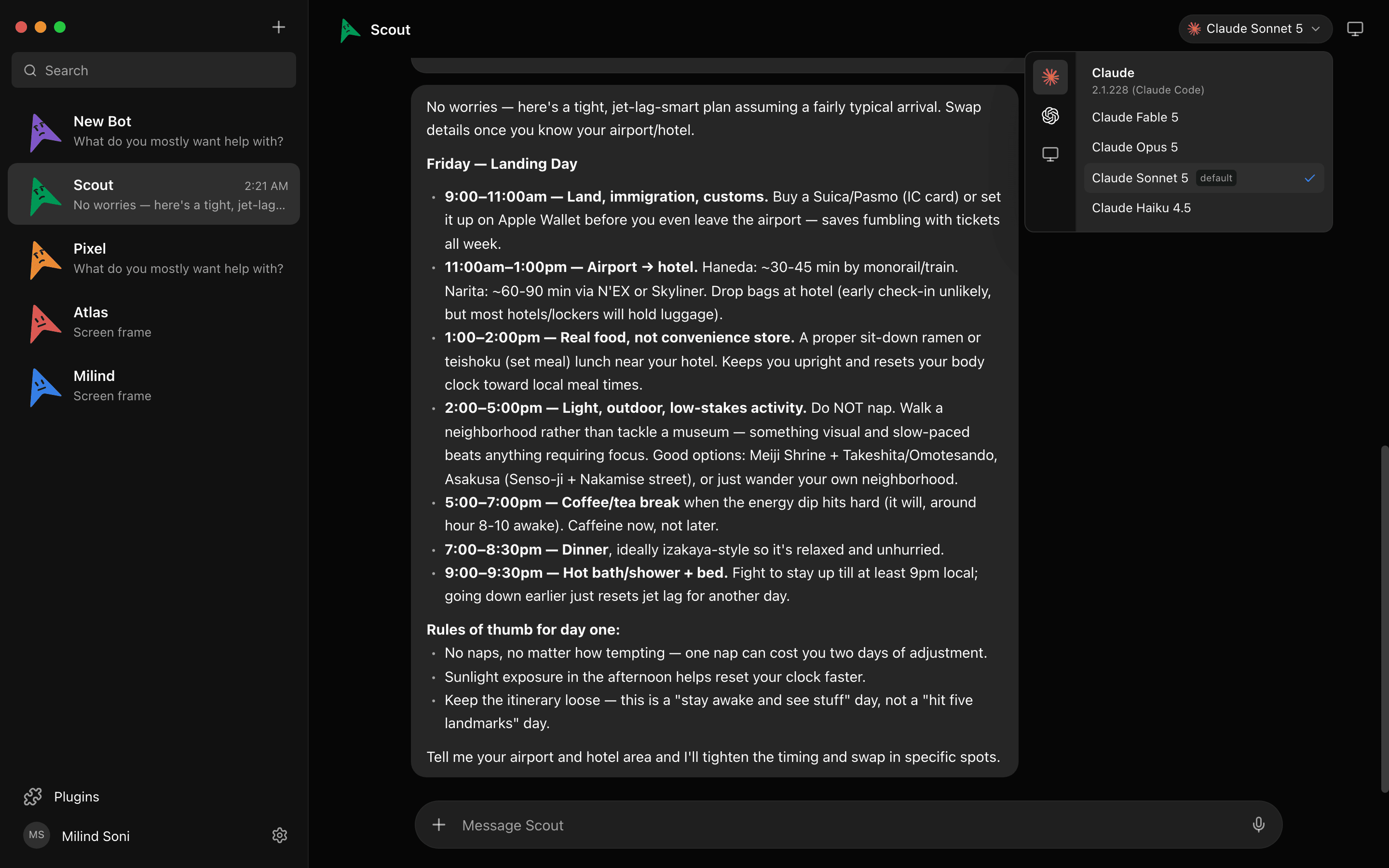
The setup steps are in how to run Claude Code and Codex side by side, and the Claude half of this comparison is in MausBot vs Claude Code.
A bot per job, not a chat per repo
Codex organises work around a repository. MausBot organises it around a contact. Each bot has its own thread, its own computer, and its own connected apps over Composio, so the roster can include a bot that triages your inbox, one that does research, and one that watches ops, alongside the one that writes code. A bot that is not a coding agent can still run on the Codex CLI; the engine and the job are separate choices.
Phones and voice
MausBot has iOS and Android companion apps that show the same bots and the same threads. Bots can read replies aloud, and you can call one in the app. Codex reaches the phone differently, through cloud tasks and Codex Remote in the ChatGPT mobile app, and both of those are about code.
Approval cards in the chat
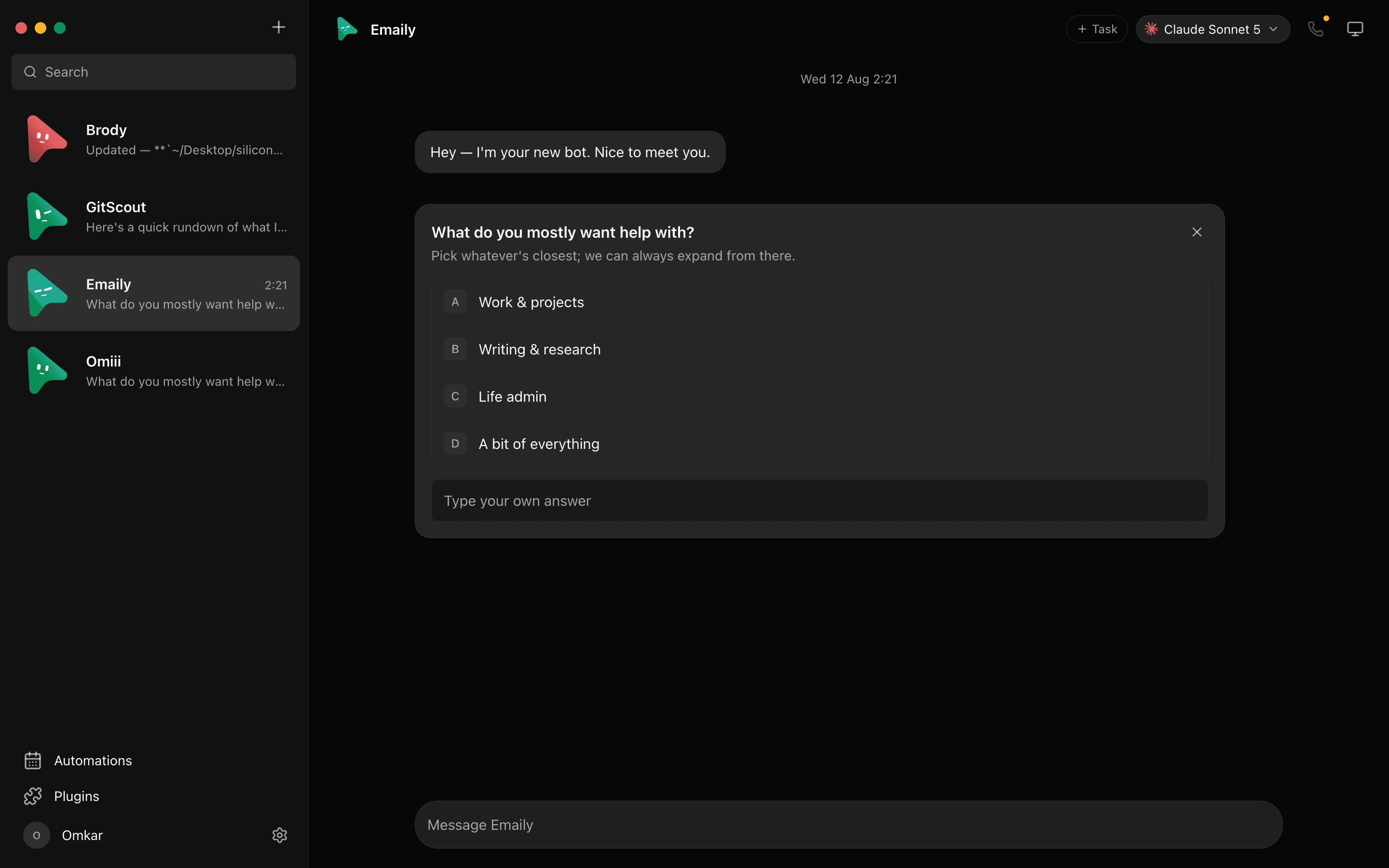
When a MausBot bot wants to run a shell command or edit a file, the request appears as a card in the conversation: allow or deny. When it has a question, the card carries the options. The cards look the same whichever engine is behind the bot, which matters once you have Codex and Claude bots in the same room.
Open source end to end
The Codex CLI is open source; the IDE extension and Codex Cloud are listed as not open source. MausBot is Apache 2.0 throughout, and the conversation record lives in ~/.openmausbot on your own disk. What leaves your machine is what you send to the model you chose.
What changes when Codex runs inside MausBot
Less than you might expect, and it is worth being exact about it.
- It is the same CLI. MausBot drives the
codexCLI installed on your machine, with your ChatGPT sign-in. Setup can install the CLI for you and offers device-code sign-in. - It is the same quota. Your plan's Codex limits apply exactly as they do in Codex. MausBot adds no charge and no second quota. On OpenAI's side, local messages and cloud chats share one pool, so a busy MausBot bot and a busy Codex Cloud task draw from the same allowance.
- It is the same MCP config. Codex bots read the MCP servers in your
~/.codex/config.toml, so the tools you set up for the terminal are there in the chat. - API keys are chat only. A ChatGPT subscription does not include separately billed API usage, and API-key connections in MausBot currently support chat, not agent tools. For a Codex bot that edits files and runs commands, sign in with ChatGPT.
- Codex Cloud is not part of it. MausBot does not use Codex Cloud. A bot on your laptop stops when the laptop sleeps, unless that bot is on a cloud computer or you are on a paid MausBot cloud plan.
Limits and price, side by side
Codex. Per OpenAI's pricing page: Free ($0) and Go ($8) get GPT-6 Luna at standard speed in the desktop app, "subject to rollout." Plus, at $20, adds the web, CLI, IDE, iOS, cloud code review, and Slack, with GPT-6.1 Sol and Luna. Pro comes at $100, $200, and $500. Business is $20 per user billed annually or $25 monthly. An API key works at API rates in the CLI, SDK, and IDE, with "no cloud-based features." Plus has a five-hour window, and weekly limits may also apply; the page says "Pro plans currently have no five-hour limit." Third-party reports, not OpenAI's own pages, say the Pro $200 allowance was cut from 20 times Plus to 10 times.
MausBot. The app is free and adds no quota of its own. You still need something for a bot to run on: a ChatGPT plan for Codex, or another engine such as Claude or Grok. The paid MausBot cloud plans, Personal at $29 a month, Pro at $49, and Max at $99, keep bots running with the laptop closed. Model usage stays on your own account and is billed by your provider. The details are on the pricing page.
So the two bills do not overlap. OpenAI charges for the ChatGPT plan, which covers the model and Codex Cloud. MausBot charges only if you want its cloud computers.
Who should use which
Codex alone is right if your work is software, you are happy on OpenAI models, and you want diffs, worktrees, pull request review, and cloud tasks that run while your computer is asleep. Nothing in MausBot improves on that.
MausBot alone is right if you pay for Claude or Grok rather than ChatGPT, or if you are not a developer at all and want bots for your inbox, research, and recurring chores in an app that looks like a messenger.
Both is right if you pay for ChatGPT and Claude and want them on the same task, or want Codex as one bot among several. Keep Codex's own app for the repository work it is built for, and use MausBot for the room where a Codex bot and a Claude bot check each other.
Frequently asked questions
- Is MausBot a Codex alternative?
- Only partly. If what you want from Codex is a coding agent with a diff pane, pull request review, and Codex Cloud tasks, MausBot is not a replacement, because it has none of those. If what you want is a GUI for several agents, an open-source codebase end to end, or Codex working next to Claude, MausBot covers that, and it does so by running the Codex CLI rather than replacing it.
- Can I use Codex with Claude?
- Not inside Codex's own app, as far as the docs describe: its built-in model picker lists only OpenAI models. In MausBot you can. Put a Codex bot and a Claude bot in one group room and they hand work to each other, or switch a single bot between Codex and Claude mid-conversation. Each bot uses its own sign-in: your ChatGPT plan for Codex, your Claude plan for Claude.
- Do I need ChatGPT Plus to use Codex in MausBot?
- You need a ChatGPT sign-in that includes Codex in the CLI. OpenAI's pricing page lists the CLI from Plus, at $20 a month. Free and Go are listed with the desktop app and GPT-6 Luna, subject to rollout. MausBot itself needs no plan, and a bot can run on Claude or Grok instead if that is what you pay for.
- Does MausBot use up my Codex limits?
- Yes, in exactly the way Codex itself does. A MausBot bot on Codex drives the codex CLI with your ChatGPT sign-in, so its messages count against your plan's Codex limits. MausBot adds no charge and no second quota on top.
- Is Codex open source?
- The Codex CLI is, under Apache 2.0, with about 127,000 stars on GitHub. OpenAI's docs list the IDE extension and Codex Cloud as not open source. MausBot is Apache 2.0 throughout.
- Is MausBot affiliated with OpenAI?
- No. MausBot is an independent open-source project. It runs the Codex CLI that you install and sign into yourself; Codex, ChatGPT, and the GPT models are OpenAI's.
Get started
Download MausBot for macOS, Windows, or Ubuntu, let setup install the Codex CLI if you do not have it, and sign in with ChatGPT. Then add a second bot on Claude and put the two in a room. The source is on GitHub under Apache 2.0.